
Installation Guide
Yarilo installs two ways. Pick the one that matches your target:
| Path | Best for | Topology |
|---|---|---|
| Docker Compose | one host: local dev, evaluation, small self-hosted installs | standalone, all roles as containers, SQLite userdb |
| Kubernetes | production, HA, multi-node | director ring + co-located backends, MySQL or Postgres userdb |
Both run the same image, docker.. A container selects its role via YARILO_ (Compose) or the Helm chart (Kubernetes).
Clients always connect to login proxies. The proxies terminate TLS and forward plaintext to the session backends; session processes have no TLS knowledge.
Examples use mail. and namespace yarilo-sb — substitute your own values throughout.
Installing with Docker Compose
A single-host standalone deployment. The backends share a Maildir store and coordinate through yarilo-auth, yarilo-warden and yarilo-locks (Redis-backed). The userdb is SQLite — no external database required.
WARNING
Single-host, not highly available. For HA or multi-node, use Kubernetes.
This section is the quickstart. MTA integration, operations and the full service reference are in Docker Compose; the deployment files live in deploy/.
Prerequisites
- Docker Engine 24+ with the Compose v2 plugin (
docker compose version) - Free host ports: 143/993, 110/995, 587/465, 4190, 8443, and — loopback-only by default — 24, 12345, 12340. Override in
..env - ~512 MB RAM
Quickstart
cd deploy/compose
cp .env.example .env
sed -i.bak "s/^BACKEND_API_TOKEN=.*/BACKEND_API_TOKEN=$(openssl rand -hex 32)/" .env
./gen-certs.sh mail.example.com
docker compose up -d
docker compose ps
This sequence:
- Copies the default environment; adjust the image tag or ports in
.if neededenv - Sets
BACKEND_, the bearer token ofAPI_ TOKEN yarilo-backend-api; compose refuses to start without it - Generates a self-signed TLS certificate for local use
- Starts all containers;
docker compose psshould report every one ashealthy
gen-certs. writes tls/ and tls/. The key is world-readable so the uid-1000 container can load it.
For a public deployment, drop a real certificate and key (e.g. Let's Encrypt fullchain. / privkey.) into deploy/ as cert. / key. and restart the login proxies. The tls/ directory is git-ignored.
Creating the first user
The SQLite userdb lives in the state volume at /. yarilo-auth creates the yarilo_ table on first start.
Insert a user with a one-off sqlite container:
docker run --rm -v yarilo_state:/data nouchka/sqlite3 /data/users.db \
  "INSERT INTO yarilo_users (username,password,home,mail,enabled) VALUES \
   ('[email protected]','{PLAIN}changeit', \
    '/var/mail/vhosts/mail.example.com/[email protected]', \
    'maildir:/var/mail/vhosts/mail.example.com/[email protected]',1);"
The mail column is the per-user mail location (maildir: / sdbox: / mdbox:).
TIP
{PLAIN} is fine for local testing only. Use a hashed scheme ({BCRYPT}…) for anything real.
Sending and reading a test message
Deliver a message via LMTP on the loopback port, as your MTA would:
printf 'LHLO t\r\nMAIL FROM:<[email protected]>\r\nRCPT TO:<[email protected]>\r\nDATA\r\nSubject: hi\r\n\r\nhello\r\n.\r\nQUIT\r\n' \
  | nc 127.0.0.1 24
Read it back over IMAPS — with the self-signed certificate the verify warning is expected:
printf 'a login [email protected] changeit\r\nb select INBOX\r\nc logout\r\n' \
  | openssl s_client -quiet -connect 127.0.0.1:993
Or run the bundled smoke test. The entrypoint dispatches on YARILO_, so invoke the binary directly:
docker compose exec yarilo-imap \
  yarilo-smoketest -host yarilo-imap-login -imap-port 10993 \
  -telemetry http://yarilo-imap-login:8080 -insecure=true
Listening ports
| Service | Host port | Notes |
|---|---|---|
| IMAP / IMAPS | 143 / 993 | login proxy, STARTTLS / implicit TLS |
| POP3 / POP3S | 110 / 995 | login proxy |
| Submission | 587 / 465 | login proxy |
| ManageSieve | 4190 | login proxy |
| JMAP | 8443 | login proxy, HTTPS |
| LMTP | 24 (loopback) | unauthenticated — for your MTA only |
| SASL auth | 12345 (loopback) | fronting MTA: smtpd_ |
| Quota policy | 12340 (loopback) | fronting MTA: check_ |
Wiring a fronting Postfix — LMTP delivery, SASL auth, quota policy — is covered in Docker Compose.
Operations
To follow logs of any service:
docker compose logs -f yarilo-imapSet LOG_ in . for verbose output.
To upgrade, bump YARILO_ in ., then:
docker compose pull && docker compose up -dTo back up, snapshot the mail (messages + indexes) and state (userdb) volumes.
For the admin CLI, run yarctl inside yarilo-backend-api, whose environment already carries the API address and token:
docker compose exec yarilo-backend-api yarctl backend user info [email protected]To uninstall:
docker compose downAdd -v to also delete the mail, state and redis volumes — this destroys all data.
Installing on Kubernetes
The production topology: a director ring (a Deployment) routes each user to a single co-located backend pod that carries every protocol, fronted by per-protocol login proxies, with shared yarilo-auth, yarilo-warden, yarilo-locks (Redis-backed) and yarilo-quota-status.
See Deployment and the diagrams yarilo_director.svg / yarilo_backend.svg for the full rationale.
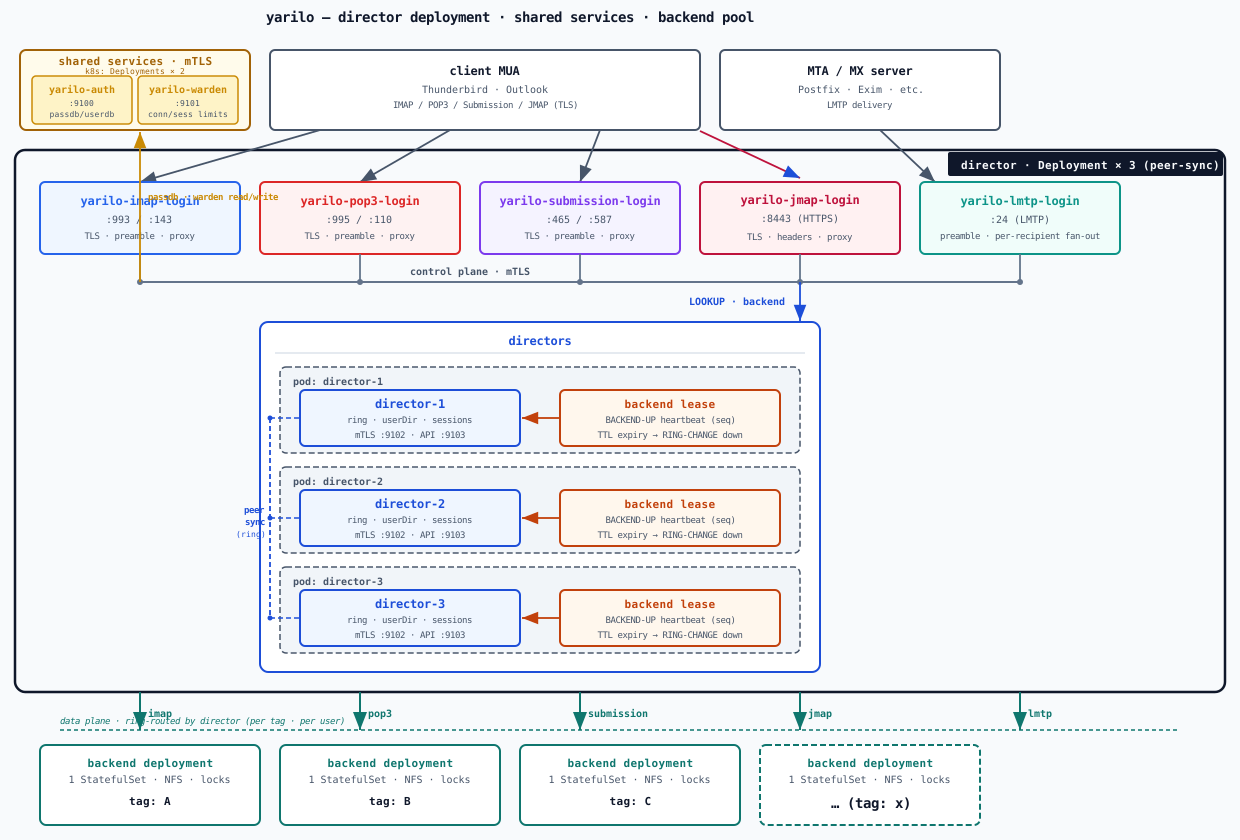
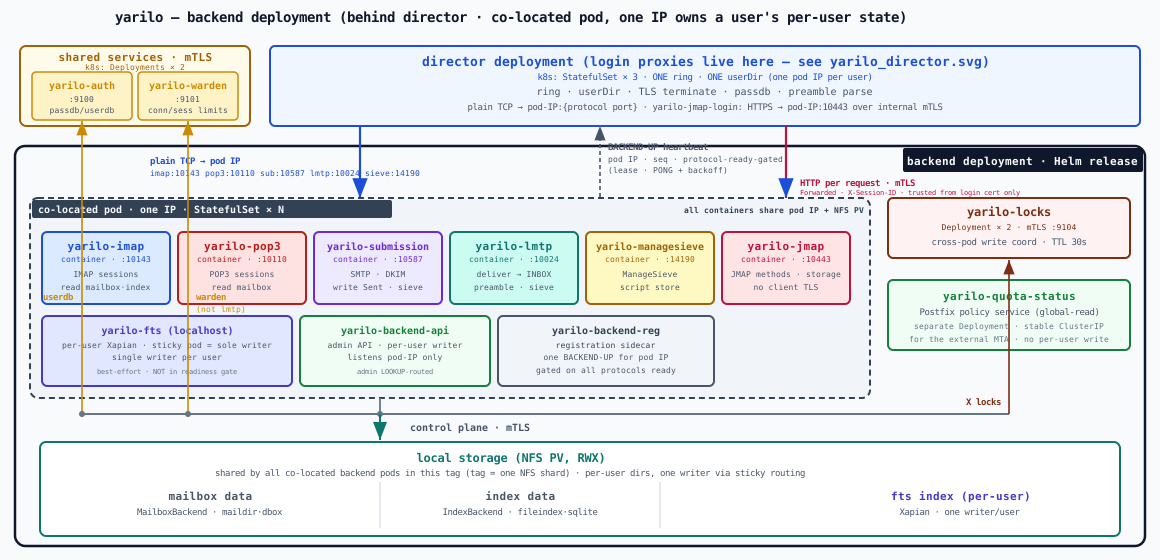
This section uses the sandbox example (helm_, a single-node microk8s namespace yarilo-sb). Production notes are called out inline.
What you'll end up with
| Component | Kind | Purpose |
|---|---|---|
yarilo-director | Deployment | answers the login proxies' LOOKUP from a consistent-hash ring; owns backend routing |
yarilo-backend | StatefulSet | co-located pod: imap / pop3 / submission / lmtp / managesieve / jmap + fts + backend-api + reg sidecar |
yarilo-*-login | Deployments | TLS-terminating login proxies (imap / pop3 / submission / lmtp / managesieve / jmap / sasl) |
yarilo-auth | Deployment | passdb + userdb against the SQL store |
yarilo-warden | Deployment | connection accounting, auth-penalty, cross-node kick bus |
yarilo-locks | Deployment | cross-process write coordination (mTLS :9104, Redis-backed) |
yarilo-quota-status | Deployment | RCPT-time quota policy service for a fronting MTA |
| SQL StatefulSet | StatefulSet | passdb / userdb store (sandbox only — use managed SQL in production) |
yarilo-tls Secret | Secret | TLS certificate provisioned by cert-manager |
| LoadBalancer Services | Service | public entry for IMAP, POP3, Submission and JMAP (143/993, 110/995, 587/465, 8443); yarilo-managesieve-login (4190) and yarilo-lmtp-login (24) default to ClusterIP — set components. to publish them |
Prerequisites
DNS
An A (or AAAA) record for the public hostname pointing at the LoadBalancer IP your cluster will assign:
mail.example.com A <LB-IP>::: note For real mail you also need MX, SPF/TXT, DKIM and PTR records, and the zone should be served by more than one nameserver — see DNS for a mail domain. For the sandbox an A record is enough — the smoke test connects by hostname. :::
cert-manager
helm repo add jetstack https://charts.jetstack.io
helm repo update
helm install cert-manager jetstack/cert-manager \
  --namespace cert-manager --create-namespace \
  --version v1.16.x \
  --set installCRDs=true
kubectl -n cert-manager get pods
All cert-manager pods should report Running before you continue.
ClusterIssuer
The repo ships deploy/ with two solvers: http01 (nginx ingress) and dns01 (Cloudflare, used for mail since no port 80 is needed).
Edit it — replace admin@example. / example. — then apply:
kubectl -n cert-manager create secret generic cloudflare-api-token \
  --from-literal=api-token=<CLOUDFLARE-API-TOKEN>
kubectl apply -f deploy/clusterissuer.yaml
kubectl get clusterissuer letsencrypt-prod
The ClusterIssuer should report STATUS: Ready.
LoadBalancer support
The chart provisions Service objects of type LoadBalancer. Ensure a controller can fulfil them:
- microk8s —
microk8s enable metallband assign an IP range - k3s — bundled
klipper-lbworks out of the box - EKS / GKE / AKS — the cloud LB controller handles it automatically
Setting up the passdb / userdb store
yarilo-auth resolves logins from a SQL store. Two sandbox manifests ship: MySQL is the default wired by values-sandbox.; Postgres is an alternative.
Both put login (passdb) and storage/quota/routing (userdb) in the same store. The split into passdb_ / userdb_ / userdb_ lives in values-sandbox., so migrating to a production layout only changes the queries.
Production
Swap the sandbox manifest for a managed SQL DSN: replace the dsn key in the Secret and run the init SQL against the managed instance. The Secret reference in values-sandbox. stays the same.
MySQL (default)
helm_ creates namespace db, a mysql Secret (DB yarilo, user yarilo / sandbox-secret), an init ConfigMap and a MySQL 8.4 StatefulSet. The schema is the PostfixAdmin layout: domain, alias and mailbox tables.
kubectl apply -f helm_values/mysql-sandbox.yaml
kubectl -n db get pods,svc,pvc
The mailbox table is what values-sandbox. queries — columns are matched by name, password is the only required one, active maps to enabled. Its DSN reaches yarilo-auth through the YARILO_ env var, injected from the mysql Secret; skip_ keeps yarilo-auth from creating its own table.
Seed a user — domain + mailbox + alias rows:
kubectl -n db exec -i mysql-0 -- mysql -uyarilo -psandbox-secret yarilo <<'SQL'
INSERT IGNORE INTO domain (domain, transport, customer_id, active)
VALUES ('mail.example.com', 'virtual', 'cust-0001', 1);

INSERT IGNORE INTO mailbox
  (username, password, mbtype, home, mpath, maildir, local_part, domain, active)
VALUES
  ('[email protected]', '{BCRYPT}REPLACE_WITH_HASH', 'mdbox',
   '/var/mail/vhosts/', 'mail.example.com/[email protected]', 'mdbox',
   'alice', 'mail.example.com', 1);

INSERT IGNORE INTO alias (address, goto, domain, active)
VALUES ('[email protected]', '[email protected]', 'mail.example.com', 1);
SQL
Generate the hash with htpasswd -nbB alice '<password>' | cut -d: -f2 and prefix it with {BCRYPT}.
Postgres (alternative)
helm_ creates a yarilo-postgres StatefulSet (PG 16, user yarilo / sandbox-secret) with a single users table covering passdb (username / password / active) and userdb (home / mail_ / quota / allow_ / director_).
kubectl apply -f helm_values/postgres-sandbox.yaml
kubectl -n yarilo-sb get pods,svc,pvc
To use Postgres instead of MySQL, point yarilo-auth at this store and switch the passdb block in values-sandbox. to driver: postgres with the users-table queries. The postgres-sandbox. header documents the columns and the expected passdb_ / userdb_ / userdb_.
Seed a user:
kubectl -n yarilo-sb exec -i yarilo-postgres-0 -- \
  psql -U yarilo -d yarilo -c \
  "INSERT INTO users (username, password, active, display_name)
   VALUES (LOWER('[email protected]'), '{BCRYPT}REPLACE_WITH_HASH', TRUE, 'Alice');"
With home / mail_ left blank, yarilo derives the path from storage. (default %d/ → <maildir_). Set home to an absolute path to override per user.
Deploying yarilo
helm upgrade --install yarilo ./helm \
  -f helm_values/values-sandbox.yaml \
  -n yarilo-sb
Listeners brought up by the login proxies:
| Listener | Port | TLS mode | Service |
|---|---|---|---|
| IMAPS / IMAP | 993 / 143 | implicit TLS / STARTTLS | LoadBalancer |
| Submissions / Submission | 465 / 587 | implicit TLS / STARTTLS | LoadBalancer |
| POP3S / POP3 | 995 / 110 | implicit TLS / STARTTLS | LoadBalancer |
| ManageSieve | 4190 | STARTTLS | ClusterIP by default |
| JMAP | 8443 | HTTPS | LoadBalancer |
| LMTP | 24 | plain (front it with an MTA) | ClusterIP by default |
| Telemetry | 8080 | — | ClusterIP only — /, /, / |
Waiting for the certificate
cert-manager creates a Certificate, runs the DNS01 challenge, and writes the result into the yarilo-tls Secret mounted by the login proxies. No restart is needed once it is populated.
kubectl -n yarilo-sb get certificate yarilo-tls -wWait for READY=True; first issuance typically takes 1–3 minutes. If it hangs:
kubectl -n yarilo-sb describe certificate yarilo-tlsGetting the LoadBalancer IP
Each login proxy has its own LoadBalancer Service; the IMAP one is the usual public entry.
kubectl -n yarilo-sb get svc yarilo-imap-login -w
dig +short mail.example.com
Wait for EXTERNAL-IP, then confirm DNS resolves to it.
Running the smoke test
app/ drives the full flow: Submission AUTH, LMTP delivery, IMAPS LOGIN + SASL, POP3S. From the repo, against the public host:
go run ./app/smoketest-e2e/ \
  -host mail.example.com \
  -user [email protected] \
  -pass '<password>' \
  -submission-port 587 -lmtp-port 24 -imaps-port 993 -pop3s-port 995
For an in-cluster protocol/sieve check, the yarilo-smoketest binary runs as a Job against the login-proxy Services — see hack/.
Troubleshooting
| Symptom | Likely cause | Fix |
|---|---|---|
Certificate stuck Issuing | Cloudflare API token missing/expired | kubectl -n cert-manager describe order …; recreate cloudflare-api-token |
| login pod CrashLoopBackOff at startup | YARILO_ resolves empty | check the SQL Secret's dsn key is populated and base64-encoded |
LoadBalancer stuck <pending> | no LB controller / metallb not enabled | enable metallb or set service. for the sandbox |
Smoke test tls: handshake failure | DNS not yet at the LB, or cert still issuing | dig the host, kubectl get certificate, wait |
| AUTH fails for the seeded user | wrong table/column or missing {SCHEME} prefix | MySQL: mailbox row has active=1; Postgres: users row has active=TRUE; verify the {BCRYPT} prefix |
There is no single yarilo Deployment — read logs per component:
kubectl -n yarilo-sb logs deploy/yarilo-imap-login --tail=200 -f
kubectl -n yarilo-sb logs deploy/yarilo-auth --tail=200 -f
LOG_ is on by default in values-sandbox..
Uninstalling
helm uninstall yarilo -n yarilo-sb
kubectl delete -f helm_values/mysql-sandbox.yaml
Use postgres-sandbox. in the second command if you deployed Postgres.
WARNING
PVCs (backend maildir, SQL data) are deleted with their namespaces. To keep mail data, take a kubectl cp snapshot first.
Storage layout
Yarilo storage follows the mail_ pattern: MailboxBackend and IndexBackend are per-process factories; UserMailbox / UserIndex are per-session handles created once after authentication and closed when the session ends. All per-user state — filesystem root, quota, uid/gid — is captured in mailbox. at login time.
The global home layout is controlled by two config keys:
storage:
  maildir_root: /var/mail/vhosts     # prepended to template-derived paths
  mail_home: "%d/%u"                 # %d=domain, %n=local-part, %u=full address
The default %d/ gives /. Use %d/ for /, or %n for single-domain setups. mail_ is the pre-beta spelling of mail_ and is still accepted. Per-user relocation is a DB-only change — populate home — with no code or config change.
A username that would be a path has no home: one holding /, \ or NUL, an empty local part, or a local part or domain that is . or .. Such a login is refused and such an LMTP recipient gets 550 5..
See Mailbox Storage for backends (maildir, sdbox, mdbox), self-healing and rotation tuning, and Quota for enforcement.